
Choose Eden at $39 billed monthly when you want to turn a selected ticker into an entry, invalidation, and dated-target plan. Choose QuantData at $74.99 billed monthly when you want a broader options research dashboard. Its current tools include forward price ranges, so the difference is the planning workflow and target horizon, not simply whether a tool has targets.
How we compared Eden and QuantData
We checked the official pages on November 20, 2026. We compared the job each tool helps you finish, target dates, coverage, and billing. This is a review of public product information, not a test of trading returns or a timed comparison of both apps.
Yes, Eden wrote this. Eden is one of the two tools on this page.
QuantData’s pricing route leads to its app, where the text fetch did not expose the plan details. We used its public options pricing, futures plans, API pricing, and help guides. We did not verify every feature behind the app login. Professional pricing was not verified and is not quoted here.
Key takeaways
- Eden’s monthly price is $35.99 lower than QuantData’s monthly options plan.
- Eden ties upper and lower targets to listed expiration dates.
- QuantData documents near-term forward ranges as well as reference levels and market-condition tools.
- Use Eden’s public count of 6,000+ US optionable tickers; test the specific symbol you need.
- QuantData’s futures and API products have separate prices. They are not the $74.99 options dashboard.
Eden vs QuantData at a glance
| Decision | Eden | QuantData |
|---|---|---|
| Main use | Build a plan for a chosen ticker | Study options transactions, positioning, and market conditions |
| Targets | Upper and lower estimates tied to an expiration date | Documented forward range and typical move over 30–120 minutes |
| Coverage | 6,000+ US optionable tickers on the public homepage; supported stocks, ETFs, and indices | 6,000+ tickers in the official tool guides; separate futures product |
| Monthly options-analysis cost | $39 billed monthly | $74.99 billed monthly |
| Annual billing | $374.40 per year | $62.50 per month, billed annually |
| Other products | This comparison covers Eden’s ticker-planning product | Separate futures, combined options-and-futures, and API plans |
| Your part | Set confirmation, risk, size, and exits | Turn the research into your own trading rules |
Prices checked November 20, 2026. Annual rates require annual billing. See Eden pricing, QuantData pricing, and the QuantData tool guide.
What Eden helps you do
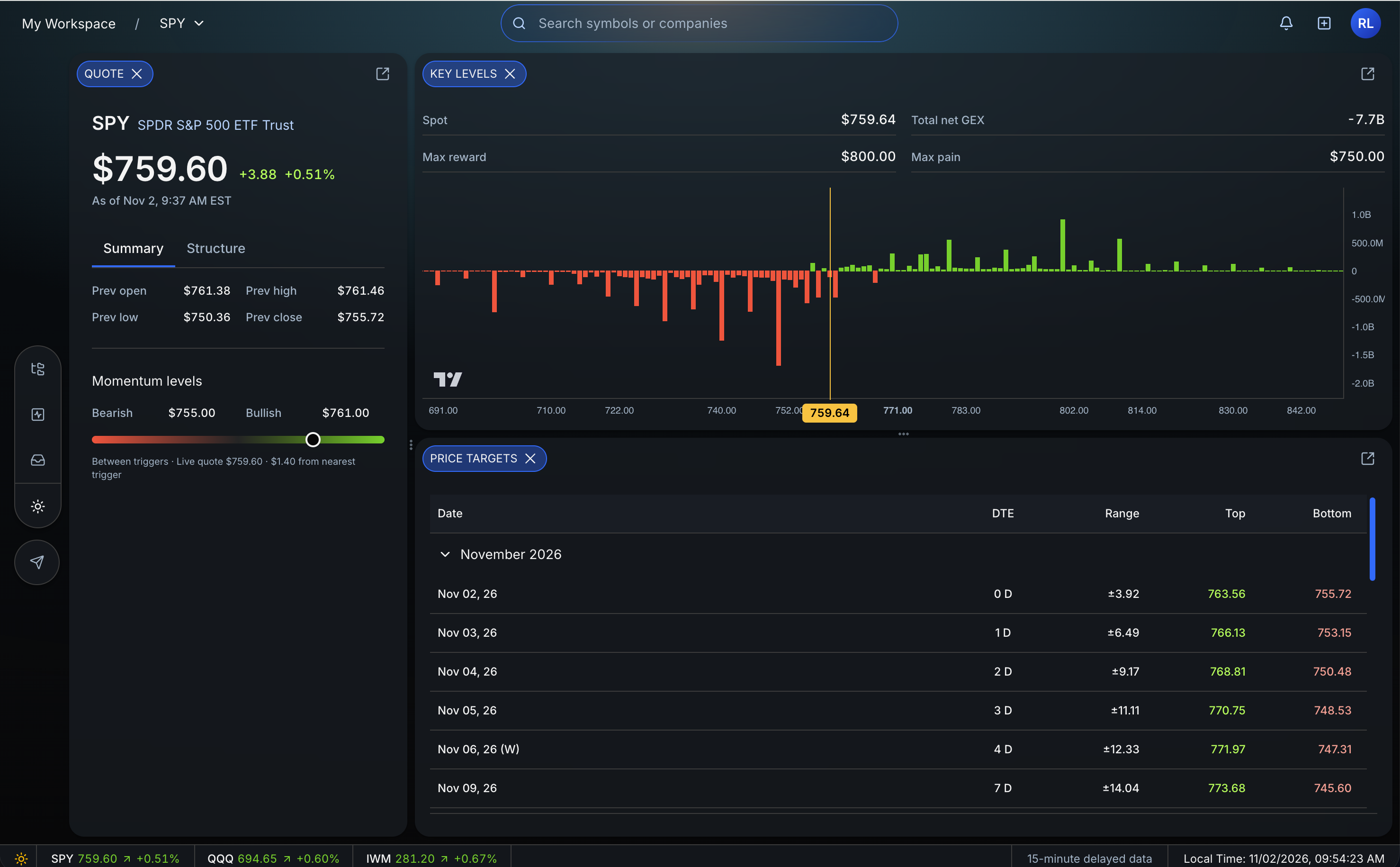
Eden is built for the moment when you have a ticker and need a plan. Open it, check structure and momentum, mark nearby key levels, and choose a price target for your date.
Eden’s public product promise is access to that analysis in less than 10 seconds. It is not a measured promise that every trader can finish every decision in that time. You still decide what price must do before entry, where the idea fails, and how much to risk.
What QuantData helps you do
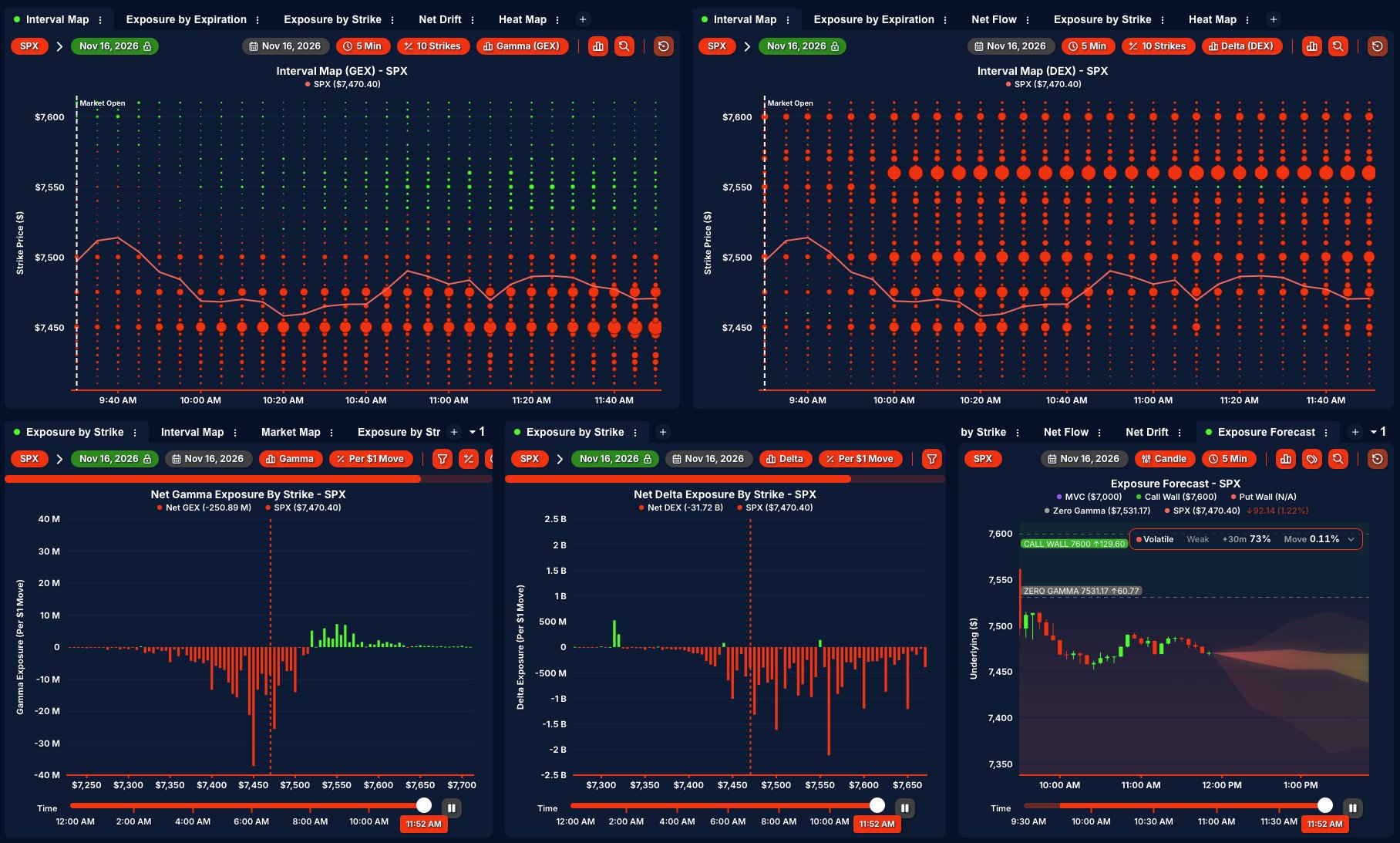
QuantData is a wider research workspace. Its options product combines live and historical transaction records, estimates of market-maker positioning, off-exchange stock trades, news, and alerts. The public plan includes web, iOS, and Android access. See its official product overview.
Its Exposure Forecast adds a read on the current market environment: rangebound, trending, or moving sharply. It also shows a forward price range. That gives a trader more context to review before deciding on a setup. The official guide explains its limits.
The key differences
1. A dated destination versus a near-term range
Eden: Choose a listed expiration and record the upper and lower target for that date. This helps you match the target to how long you plan to hold.
QuantData: The documented forecast looks ahead 30, 60, 90, and 120 minutes. It includes typical moves and a shaded forward range that can help with targets and stops.
Proof: Compare Eden’s expiration-based target guide with QuantData’s forecast guide. We did not verify a matching expiration-target table in QuantData. We are not claiming it has no targets or cannot help build a plan.
2. The monthly cost of the job you need done
For monthly billing, $74.99 − $39 = $35.99. That is the subscription gap, not a claim about trading results.
Choose Eden if the main problem is finding the levels and a dated destination for your ticker. A larger research suite may be worth more to you if you regularly use its added views. Do not pay for extra screens unless they change a decision you make.
Proof: Eden’s pricing and QuantData’s public options pricing. QuantData advertises a 7-day trial for that plan, restricted to non-professional personal use. Confirm eligibility and the checkout terms.
3. Research detail versus a focused planning path
Eden starts with a simple question: where would this trade become valid, where would it be wrong, and where could it go by my chosen date?
QuantData’s Interval Map shows how estimated positioning changes by price through the session. That can suit someone who wants to study how the market develops, rather than only copy a few levels onto a chart.
Proof: The linked tool guide explains that its estimates are context, not entry signals. Our recommendation is a workflow judgment: test both with the same ticker and the same decision.
4. Futures and developer access are separate buying decisions
QuantData lists Futures at $74.99 monthly, or $62.49 per month billed annually. Its Options + Futures plan is $119.99 monthly, or $99.99 per month billed annually. Those products include direct CME market data and futures research tools. Source: QuantData Futures.
Its separate API with MCP access is $149.99 monthly, or $124.99 per month billed annually. This is for getting data into software or compatible assistants, rather than only viewing a dashboard. Source: QuantData API.
Eden’s fit in this comparison is US stocks, ETFs, and supported indices. It is not the alternative for direct CME futures analysis. Do not compare a futures bundle or API price with Eden’s ticker-planning price as though they buy the same thing.
What traders say: inspect the evidence
We have not collected independent QuantData customer interviews for this comparison. There is no customer-performance ranking here.
For an inspectable Eden example, read the November 5 SPY play. The trade ended with a $186 loss after the invalidation broke. It shows how a written exit rule was used, not proof that one platform outperforms another.
Who should choose Eden?
Choose Eden if you already have a ticker in mind and want structure, momentum, nearby reaction levels, and a target date in one planning routine. It is the lower monthly price of these two options products.
Before buying, try to write one clear plan with the trading-plan checklist: entry condition, invalidation, target, and risk. Judge whether the tool makes that task easier for you.
Who should choose QuantData?
Choose QuantData if you want to investigate individual options transactions, review how positioning changes during a session, or combine several research views. Its level guide describes possible support and resistance across 6,000+ tickers.
If you trade CME futures directly, examine its futures plan. If you are building software, examine the API plan. Check the actual product and symbol coverage before subscribing.
Can you use both?
Yes, if they have separate jobs. You might use a research dashboard to find ideas, then use Eden to build a dated plan for the selected ticker. Keep both only if the second subscription changes a useful decision. Otherwise, overlapping screens can add work.
When neither tool is enough
Neither a target nor a reference level is a complete trading system. You still need a broker, an entry condition, an exit rule, a position-size limit, and a way to review your trades. Eden is not a broker and does not place trades.
If you need guaranteed outcomes, neither product meets that need. If you need direct futures data, Eden is outside that scope; QuantData’s relevant product is its futures plan. A SPY or QQQ price level is not the exact price of ES or NQ.
Frequently asked questions
Which costs less, Eden or QuantData?
Eden is $39 billed monthly. QuantData’s public options plan is $74.99 billed monthly or $62.50 per month billed annually. These prices were checked November 20, 2026.
Does QuantData have price targets?
QuantData documents forward ranges and typical moves over 30–120 minutes to help set targets and stops. We did not verify an expiration-dated target table equivalent to Eden’s. That does not establish that the feature is absent from its app.
How many tickers does Eden cover?
Eden’s public homepage lists 6,000+ US optionable tickers. QuantData’s documentation also lists 6,000+ tickers. Check the exact symbol you trade rather than choosing on the headline count.
Can Eden replace QuantData for futures?
No. Eden’s fit here is supported US stocks, ETFs, and indices. QuantData sells a separate CME futures product. A stock or ETF level is not the exact price of a related futures contract.
Is QuantData’s API included in the options dashboard price?
QuantData markets its API with MCP access as a separate product, at $149.99 billed monthly or $124.99 per month billed annually. Check the product you are buying before comparing prices.
Do these tools place trades for me?
This comparison is about analysis and planning. Eden is not a broker and does not place trades. You still need your own entry rule, risk limit, and broker order controls.
Official sources
Checked November 20, 2026:
- Eden product, coverage, and pricing
- Eden Price Targets documentation
- QuantData options product and pricing
- QuantData Exposure Forecast guide
- QuantData reference-level guide
- QuantData Interval Map guide
- QuantData Futures plans
- QuantData API plans
Takeaway
Eden is our pick when you want a focused path from ticker to dated trade plan at $39 monthly. QuantData can fit a trader who wants a wider set of research tools and is willing to pay more for them. Test the work you need to finish, not the number of panels on the screen.