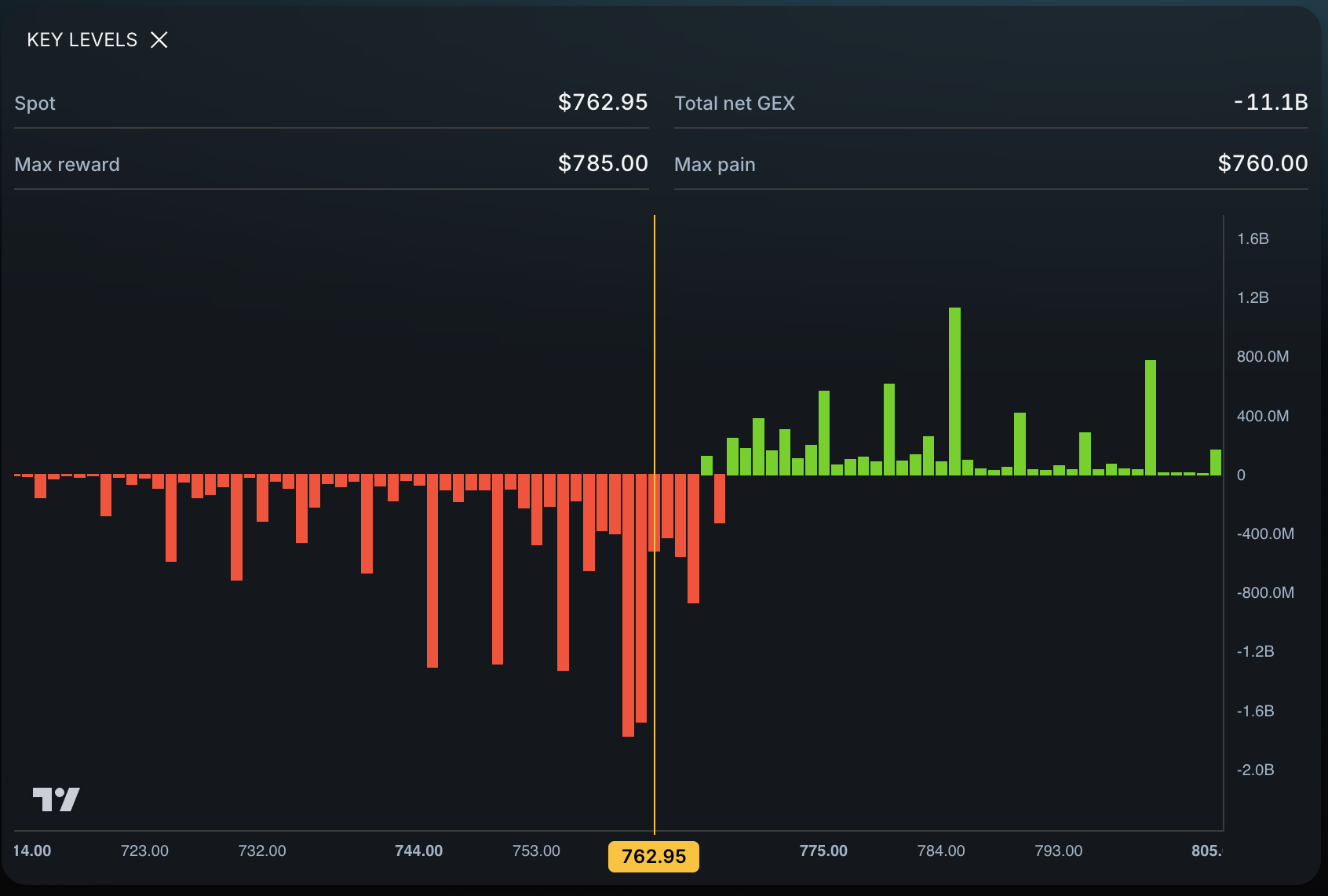
You do not need to cover an ES chart with random lines to find possible support and resistance. Open SPY in Eden, mark its bullish trigger, bearish trigger, important gamma bars, and same-day price targets, then watch how the S&P 500 behaves around that map while you execute on ES futures.
This guide walks through the process one step at a time.
Why use SPY options levels to trade ES futures?
SPY is an ETF that tracks the S&P 500. ES is CME’s E-mini S&P 500 futures contract. They have different prices and product rules, but both respond to the same S&P 500 equity market.
SPY also has a large options market. When an options market maker takes the other side of a trade, the position can leave the firm exposed to changes in SPY’s price. The firm may reduce that risk with SPY shares, equity-index futures, other options, or a mix of positions. This is called delta hedging.
Think of someone balancing a tray. When the weight shifts, they move their hands to keep the tray level. An options dealer may adjust a hedge as SPY moves and option risk changes.
This does not make every SPY options trade an ES signal. Dealers can hedge in different ways, and their complete books are not public. The useful idea is that concentrated options exposure can create prices where hedging needs may change. Eden turns SPY options positioning into a simpler map.
Use SPY in Eden for the map. Use ES for the actual futures entry, stop, position size, and exit.
Step 1: Open the SPY Key Levels widget in Eden
- Open Eden.
- Search for SPY.
- Open the Key Levels widget.
- Find the current SPY price on the histogram.
The histogram contains green and red bars at different strikes. A strike is a price listed in the options market.
You will use the bars to find:
- P-Trans, the bullish trigger level.
- N-Trans, the bearish trigger level.
- Areas of interest, or AOIs.
Read the Eden Key Levels documentation for the complete product definitions.
Step 2: Find the bullish trigger level, or P-Trans
P-Trans means Positive Transition. For this workflow, think of it as the bullish trigger level.
- Find the first green bar in a positive run.
- Check the next three bars to its right.
- All three must also be green.
- The first bar in that four-green-bar sequence is P-Trans.
An exact-zero bar is neutral and breaks the sequence.
P-Trans does not mean “buy.” It gives you a question:
Can SPY move above this level and stay above it?
A hold or reclaim can support a bullish idea. A quick move back below can weaken it.
Step 3: Find the bearish trigger level, or N-Trans
N-Trans means Negative Transition. Think of it as the bearish trigger level.
- Find the first red bar in the negative sequence.
- Check the next three bars to its left.
- All three must also be red.
- The first bar in that four-red-bar sequence is N-Trans.
An exact-zero bar breaks the sequence.
N-Trans asks:
Can SPY move below this level and stay below it?
A break and hold below can support a bearish idea. A reclaim can weaken it.
Step 4: Mark the areas of interest, or AOIs
An area of interest, or AOI, is a strike with a histogram bar that is clearly taller than the average bars nearby.
Picture the histogram as a city skyline. Most buildings are ordinary. The skyscrapers stand out. Those unusually tall bars are the strikes worth checking.
Start near the current SPY price. Mark the closest prominent bar above price and the closest prominent bar below price. Add another only when it provides a useful destination.
An AOI may behave like support, resistance, or a target. The bar identifies a place to watch; it does not guarantee a reaction.
Step 5: Put the Eden levels on your SPY chart
- Left-click a bar to place its strike on Eden’s workspace chart when the chart is visible.
- If a chart is not visible, left-clicking copies the strike to your clipboard.
- You can also right-click the bar and choose the copy action.
- Paste a copied value into your external charting tool and create a horizontal level.
Keep these values on a SPY chart. SPY and ES have different prices, so do not paste a SPY strike onto an ES chart. Keep SPY beside ES and watch both views of the same equity market.
Your SPY chart should now contain P-Trans, N-Trans, and the closest useful AOIs.
Step 6: Wait for SPY to hold, reclaim, reject, or break
Do not enter simply because SPY touched a level.
- Hold: SPY reaches a level and stays on the expected side.
- Reclaim: SPY moves through a level, returns above it, and stays above it.
- Reject: SPY tests a level and quickly turns away.
- Break: SPY moves through a level and begins staying on the other side.
Watch SPY at the Eden level while watching ES for the futures entry required by your strategy.
For example, SPY may dip to P-Trans, hold it, and begin moving higher while ES also stops falling. P-Trans identified the area; ES provides the executable setup.
Step 7: Aim for the next potential destination
After direction is confirmed, the next destination may be:
- The next AOI.
- P-Trans or N-Trans.
- An upper or lower Eden Price Target.
If SPY reclaims P-Trans, the next prominent bar above price may become the first area to monitor. If that AOI holds, the upper same-day target may become a later destination.
These are planning points, not promised outcomes.
How do you estimate how far ES can move today?
Use SPY’s Price Targets widget to view the range estimated from the selected SPY options expiration.
- Open SPY in Eden.
- Open Price Targets.
- Expand the current expiration month.
- Find today’s 0 DTE expiration when one is available.
- Review the upper target, lower target, and expected range.
Let the regular New York options session run for roughly 15 to 20 minutes before recording the values. This gives Eden time to work with active-session options data rather than a premarket snapshot.
The target is a SPY value, not an exact number of ES points. Keep SPY and ES side by side. When SPY approaches a target, manage the actual futures position from ES.
For longer plans, Eden’s Price Targets documentation explains the weekly, monthly, quarterly, and yearly horizons.
A simple bullish ES futures plan using Eden
- Open SPY in Eden.
- Mark P-Trans, N-Trans, and nearby AOIs.
- Record the current 0DTE upper and lower Price Targets.
- Keep SPY and ES open side by side.
- Wait for SPY to hold or reclaim P-Trans.
- Wait for the ES chart to confirm the long entry.
- Monitor the next SPY AOI as the first destination.
- Monitor the upper SPY Price Target as a later destination.
- Manage the stop, size, and exit using ES.
A simple bearish ES futures plan using Eden
- Open SPY in Eden.
- Mark P-Trans, N-Trans, and nearby AOIs.
- Record the current 0DTE lower Price Target.
- Keep SPY and ES open side by side.
- Wait for SPY to break N-Trans or reject it from below.
- Wait for the ES chart to confirm the short entry.
- Monitor the next lower SPY AOI.
- Monitor the lower SPY Price Target as a later destination.
- Manage the actual futures trade using ES.
The five levels to collect before the trade
Write down:
- SPY P-Trans.
- SPY N-Trans.
- The closest AOI above SPY.
- The closest AOI below SPY.
- Today’s upper and lower SPY Price Targets.
This small map helps answer where a bullish or bearish move may begin, where price may react, and how much room may remain.
What Eden does and does not do
Eden helps locate places where a decision may matter. It does not guarantee that a level will hold or a target will be reached.
The Eden map comes from SPY options data. Your ES entry, invalidation, stop, contract selection, and position size still belong to the ES trade.
Use Eden to build the map. Use price behavior to decide whether the road is open.
Frequently asked questions
What is SPY P-Trans?
P-Trans is the first strike in a run of four positive net-GEX strikes. It is the bullish trigger level in this workflow.
What is SPY N-Trans?
N-Trans is the first strike in a run of four negative net-GEX strikes when the ladder is scanned toward lower strikes. It is the bearish trigger level.
What is an AOI on SPY?
It is a prominent strike with a histogram bar that is clearly taller than nearby average bars. It may become a reaction area or destination.
Can I paste a SPY strike onto an ES chart?
No. SPY and ES use different prices. Keep the SPY levels on a SPY chart and execute the futures trade from ES.
Which Price Target should an ES day trader use?
Start with today’s 0DTE SPY row when available, after the New York options session has run for roughly 15 to 20 minutes.
Do SPY options market makers always hedge with ES futures?
No. A dealer may use SPY shares, equity-index futures, other options, or a mix. The hedge depends on the firm’s complete risk.
Official sources
- Cboe, Delta-hedge rebalancing trades and gamma
- CME Group, E-mini S&P 500 futures and ETF comparison
- State Street, SPDR S&P 500 ETF Trust