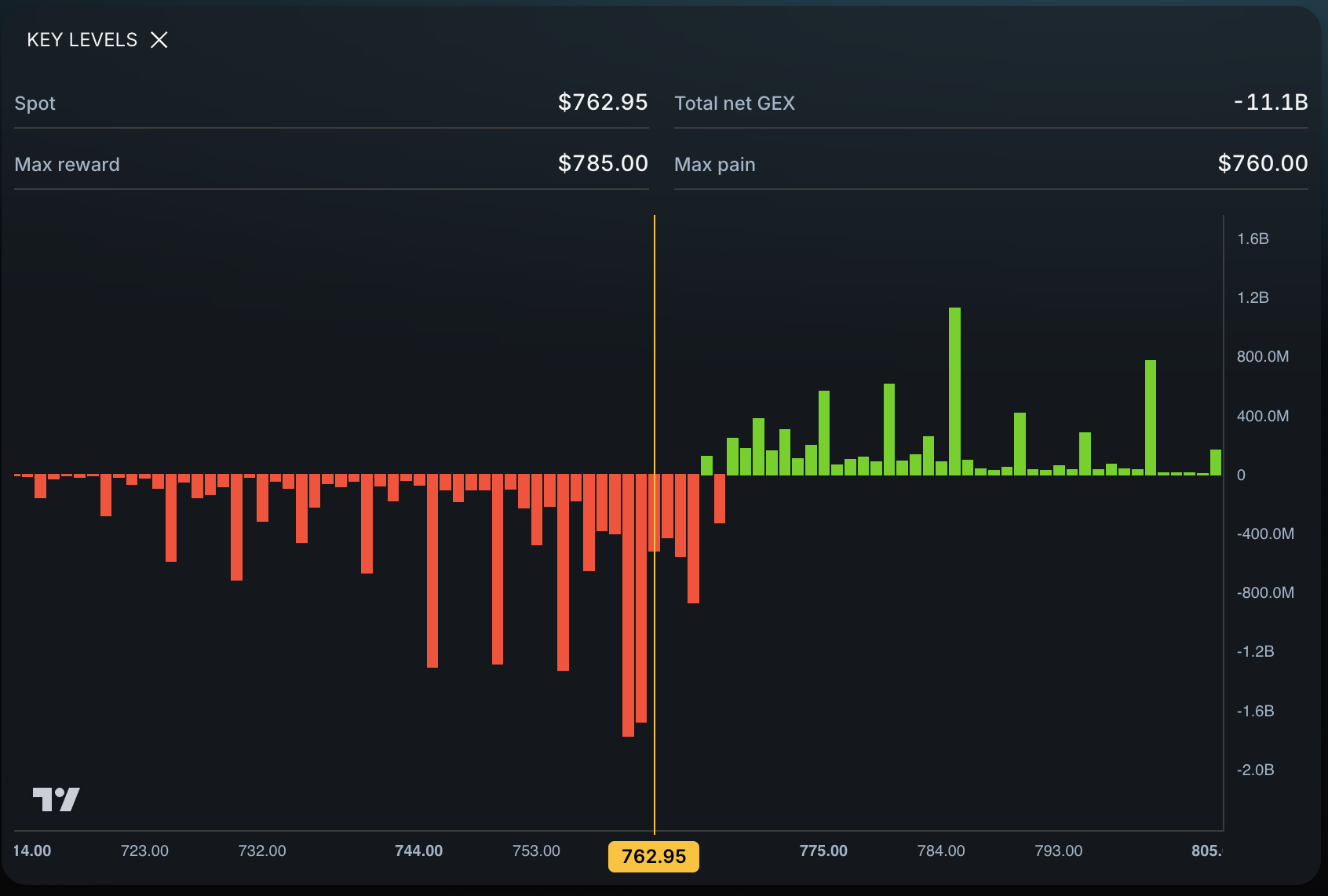
Use a related ETF in Eden to build a second map before trading futures. Open SPY for ES, QQQ for NQ, IWM for RTY, GLD for GC, SLV for SI, USO for CL, or TLT for broad Treasury context. Keep the ETF map beside the futures chart because their prices are different.
The ETF map can help you plan an entry, invalidation point, and possible target. It cannot promise a winning trade or an evaluation payout.
The major futures and ETF relationships
| Futures market | Related ETF context | Shared exposure | Important difference |
|---|---|---|---|
| ES | SPY | S&P 500 equity market | ES is a futures contract; SPY is an ETF with a different price and trading structure |
| NQ | QQQ | Nasdaq-100 equity market | NQ and QQQ have different prices, hours, and product mechanics |
| RTY | IWM | Russell 2000 small-cap equity market | RTY is futures exposure; IWM seeks to track the Russell 2000 through ETF shares |
| GC | GLD | Gold | GC is the gold futures ticker; GLD is an ETF backed by gold holdings, not a futures ticker |
| SI | SLV | Silver | SI is silver futures; SLV is a trust designed to reflect silver prices before expenses |
| CL | USO | WTI crude oil | USO holds near-month WTI futures and may differ from a specific CL contract because of its portfolio and roll process |
| ZN or ZB | TLT | Longer-duration U.S. Treasury market | ZN and ZB are specific Treasury futures; TLT tracks an index of Treasury bonds with remaining maturities above 20 years |
These markets are related, but they are not copies. Think of them as two clocks showing the same time in different formats. Watch both, but do not paste an ETF price onto a futures chart.
What ETF options levels can add
Options activity in a related ETF can point to areas where price may react. Eden organizes that data into key levels and possible price targets.
The map can help a futures trader ask:
- Is the related ETF near a decision area while my futures setup forms?
- Is there enough room to the next potential ETF target?
- Am I entering after much of the move already happened?
- Does the ETF reaction support waiting for a futures-chart confirmation?
The map cannot show every stop, guarantee a reaction, or place the futures trade for you.
The six-step workflow
- Open the futures chart. Start with the contract you plan to trade.
- Open the related ETF in Eden. For example, use SPY for ES or QQQ for NQ.
- Mark the Eden map. Find P-Trans, N-Trans, nearby AOIs, and the current price targets.
- Return to the futures chart. Watch how both markets act near their own levels.
- Wait for a reaction. Look for a hold, reclaim, rejection, or clean break.
- Write the futures trade plan. Set the entry, invalidation, possible target, and size using the futures contract and its rules.
Start with the instrument-specific guides
- ES trader’s guide to SPY options levels
- NQ trader’s guide to QQQ options levels
- Gold futures trader’s guide to GLD options levels
For a stop decision, continue to VWAP or SPY key levels for an ES stop or what to review after a three-point stop-out.
Use the map during an evaluation
Evaluation pressure can make every small move feel urgent. A written map helps you slow down and follow the account rules.
Before the order, document:
- the setup,
- the futures-chart trigger,
- the invalidation evidence,
- the potential destination,
- the allowed loss under the specific evaluation rules,
- and the contract size that fits both the stop and those rules.
The evaluation-process cluster continues with:
- How to define invalidation before an evaluation trade
- Why the same setup feels different after sizing up
- What to review before buying another evaluation
- How to lose correctly during an evaluation
- How to repair a broken trading scorecard
What this method cannot tell you
ETF context cannot replace futures quotes, contract rollover dates, tick values, margin details, order execution, or your evaluation rules.
SPY and ES respond to the same underlying equity market, but their prices are not interchangeable. Use SPY options levels as additional context and define the actual trade on the ES chart. Apply the same distinction to every pair on this page.
Frequently asked questions
Can I convert an ETF level into a futures price with a fixed multiplier?
No fixed multiplier stays reliable across every session. Compare live reactions on both instruments and place the trade using the futures chart.
Do ETF options levels predict a futures reversal?
No. They identify context and possible decision areas. Price can hold, reject, move through, or ignore a level.
Does this workflow apply to funded-account evaluations?
It can organize preparation, but it does not change the evaluation’s rules or imply a greater chance of passing or receiving a payout.
Official sources
Relationship and product distinctions checked October 5, 2026:
- CME Group, E-mini S&P 500 futures and ETF comparison
- CME Group, Nasdaq futures and options
- CME Group, Russell index futures and options
- CME Group, Gold futures vs. gold ETFs
- iShares, IWM fund objective
- iShares, SLV fund objective
- iShares, TLT fund objective
- United States Commodity Funds, USO fund objective
Takeaway
Use the ETF map to ask better questions, then make the futures decision on the futures chart. The method adds context; it does not replace execution, risk controls, or the evaluation rules.