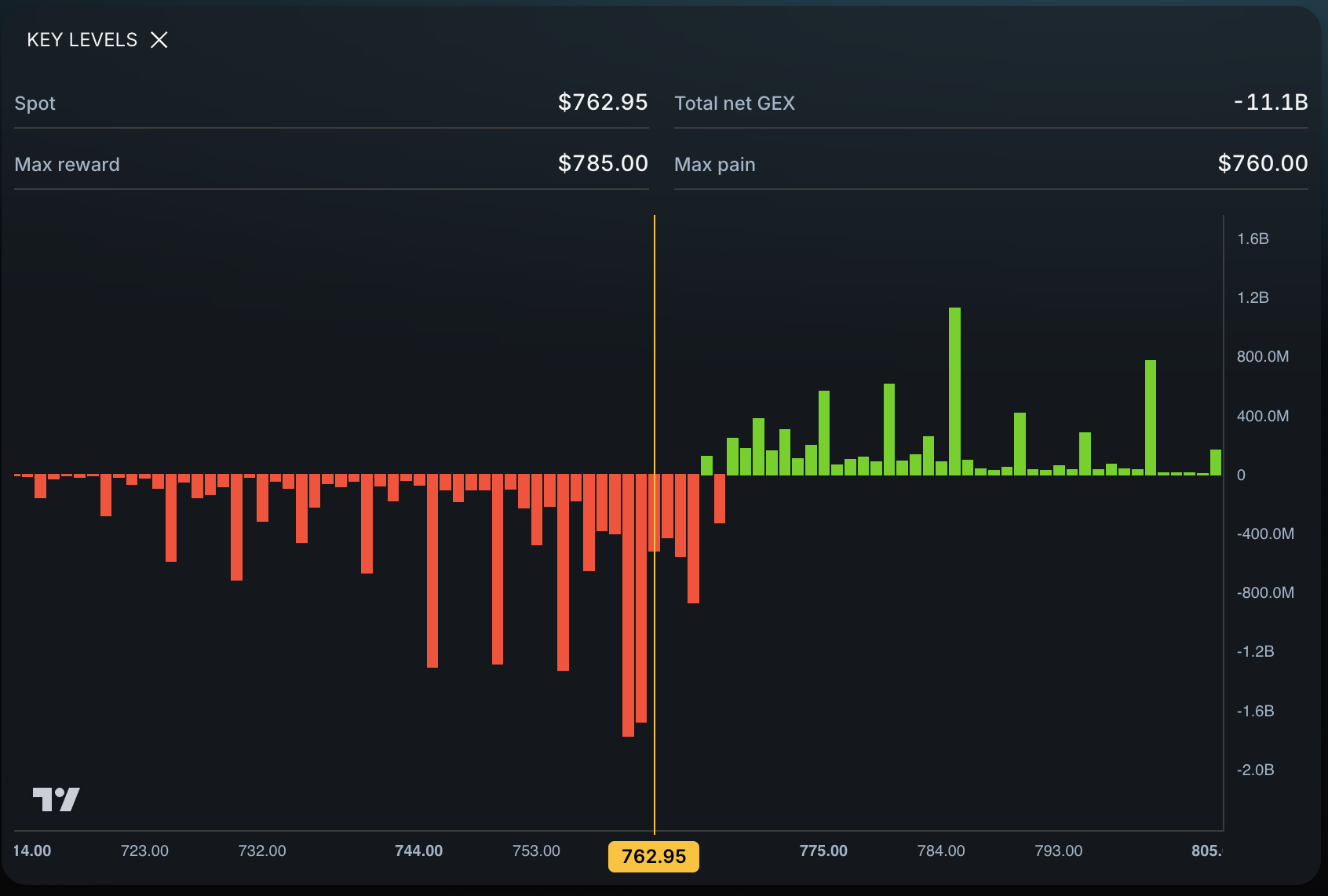
You may need both Eden and TradingView if you want TradingView for charts and alerts while using Eden to find options-derived key levels and potential targets. You may not need Eden if your current TradingView process already produces a clear entry, invalidation, and target map without extra work.
TradingView feature information checked October 5, 2026. Plans and features can change.
The tools solve different jobs
TradingView is a broad charting and market-analysis platform. Its official feature pages describe hundreds of built-in indicators, drawing tools, volume profiles, screeners, replay, community scripts, alerts, and broker connections.
Eden has a narrower job. Enter a supported ticker and see current price, nearby key levels, possible invalidation context, and potential price targets in one view.
TradingView helps you see and monitor the chart. Eden helps you decide which options-derived price areas may belong on that chart.
Eden and TradingView at a glance
| Task | TradingView | Eden |
|---|---|---|
| Chart price action | Core strength | Context appears within Eden’s product views |
| Draw lines and annotate | Extensive drawing tools | Shows its own levels; does not draw in TradingView automatically |
| Create alerts | Price, technical, drawing, strategy, and watchlist alerts depending on plan | Not a replacement for TradingView’s alert system |
| Find options-derived levels | Possible through scripts or outside sources, depending on the workflow | Core ticker experience |
| See potential targets | Trader can draw or calculate them | Potential upside and downside targets shown with the analysis |
| Place trades | Connections to selected brokers | Not a brokerage or execution platform |
When TradingView may be enough
You may not need Eden when:
- You already draw reliable support and resistance quickly.
- Your strategy depends mainly on price action or indicators already on the chart.
- You calculate or source options levels elsewhere.
- You trade a small watchlist and enjoy manual preparation.
- Another subscription would repeat information you already use.
The goal is not to collect platforms. It is to complete the plan with the least confusion.
When Eden adds a separate job
Eden may help when:
- You spend the morning searching for options-derived levels.
- Your chart has many lines but no clear invalidation or target.
- You want current price, nearby levels, and potential targets together.
- You trade several supported tickers and manual preparation is slow.
- You want another source of context beyond price history.
Eden does not replace TradingView’s chart, indicators, alerts, replay, or broker connections. It can shorten the work required to decide which price areas deserve attention.
A combined workflow
- Enter SPY, QQQ, or another supported ticker in Eden.
- Review current price, nearby levels, and potential targets.
- Choose only the values that matter to today’s setup.
- Add horizontal lines at those prices in TradingView.
- Label the source and purpose of each line.
- Define the hold, reclaim, rejection, or break required before entry.
- Use TradingView alerts to monitor the chosen prices.
- Recheck Eden during the session rather than assuming copied lines remain current.
TradingView documents price and technical alerts across web, desktop, and mobile. That makes it a practical monitoring layer after the trader chooses the relevant levels.
Avoid the crowded-chart problem
Do not copy every value into TradingView. Keep the nearest levels that affect a real decision:
- one possible entry area,
- one logical invalidation reference,
- one or two potential targets,
- and any broad market reference your strategy requires.
A line should have a job. If you cannot explain why it changes the trade, remove it.
What the combined workflow does not do
Using both tools does not guarantee a correct level or profitable trade. A copied TradingView line is static until you change it. Price can move through any options-derived level. You still choose the setup, risk, position size, and order.
For a manual comparison, read Eden vs. Drawing Support and Resistance by Hand. For SPY and QQQ, use How to Find SPY and QQQ Support and Resistance.
Frequently asked questions
Is Eden a TradingView alternative?
Only for a narrow part of the workflow. Eden can replace some level-gathering work, but it does not replace TradingView’s full charting, scripting, alert, community, or broker features.
Does Eden automatically put levels on TradingView?
No. Review the values in Eden and add the relevant ones to your chart manually.
Can I set TradingView alerts at Eden levels?
Yes. After placing a relevant value on the chart, you can use TradingView’s available price or technical alert features under your plan.
Takeaway
Keep TradingView when it is your charting and alert workspace. Add Eden when finding current options-derived levels, invalidation context, and potential targets remains a separate problem. The tools can complement each other because they perform different jobs.
Official sources
- TradingView, Features
- TradingView, Pricing and Plan Features
- TradingView, Introduction to Alerts