You can swing trade with a full-time job by finding long-term bullish setups, planning the entire trade before work, and automating orders where your broker supports them. The goal is to let the larger move develop without watching every candle.
If you are a doctor, you cannot study a chart while operating. The same rule applies to any career. Your job deserves your attention. A swing-trading plan should work around that focus instead of competing with it.
Swing trading may fit a work schedule better than day trading because positions can last days, months, or longer. It still requires preparation and regular review. It is not passive income.
For a trader who cannot watch the market all day, this workflow focuses on long setups inside a larger uptrend. Downtrends can move sharply, reverse quickly, and become more volatile. Short positions also add borrowing, margin, and potentially unlimited-loss risk. That speed and extra risk can make short trades harder to manage while working another job.
The main goal: find the next expansion higher
Look for a stock or ETF that may be preparing for its next larger move to the upside.
Start with the weekly or monthly chart:
- Confirm that the larger market structure is bullish.
- Look for a pullback from a recent swing high.
- Wait for bullish momentum to begin picking back up.
- Define where the bullish structure would fail.
Many chart indicators can measure structure and momentum. Eden’s Quote widget summarizes both so the trader can see whether the larger trend and momentum support a long setup.
A simple swing-trading schedule
Weekend: build a short watchlist
Choose a small group of liquid stocks or ETFs. Look for bullish structure on the weekly or monthly time frame, then confirm that bullish momentum is beginning to improve. Five well-prepared tickers are easier to manage than fifty random charts.
Check upcoming earnings and major economic events before adding a ticker. A strong chart can change quickly when new information reaches the market.
Evening: prepare the next session
Spend 20 to 30 minutes updating the plan:
- Remove broken setups.
- Mark the recent swing high and swing low.
- Measure the pullback and choose the entry condition.
- Write the invalidation below the structure that supports the trade.
- Select the monthly, quarterly, or yearly target.
- Set alerts near the entry and exit areas.
Imagine price pulls back about 60% of its last bullish swing. That pullback may create an entry area, but the percentage alone is not a signal. Wait for bullish momentum to return. The stop might sit below the swing low, or the plan might require a close below that low before exiting.
A wider distance between entry and stop requires fewer shares when account risk stays the same. Use the formula in How Much Should You Risk on a Swing Trade? to calculate size.
Before work: check what changed
Review overnight news and premarket gaps. A large gap can change the distance to the entry, stop, or target. Cancel orders that no longer match the plan.
During work: respond only to planned alerts
An alert means “review the setup.” It does not mean “buy now.” If you cannot review the price reaction safely, let the trade go.
After the close: record the decision
Write down whether the setup triggered, how it behaved, and whether you followed the plan. This should take a few minutes.
Use orders carefully
Limit, stop, stop-limit, bracket, and trailing-stop orders can help manage a plan, but each has trade-offs. A stop order may fill away from the stop price during a fast move or overnight gap. A stop-limit order may not fill at all.
Webull currently supports bracket-style take-profit and stop-loss orders for equities. TradingView also supports stop-loss and take-profit brackets when the connected broker supports that feature. Check the exact broker integration before depending on it.
Your broker may also handle extended-hours orders differently. Read the broker’s current order instructions before depending on automation.
How Eden fits a part-time workflow
Use Eden during the evening or before work to complete three jobs:
- Confirm the larger uptrend. Open the Quote widget and look for bullish structure on the weekly or monthly time frame. Confirm that momentum is beginning to pick back up.
- Plan the entry and stop. Open Key Levels and review the bullish and bearish trigger levels. P-Trans shows where bullish options momentum begins. N-Trans shows where bearish options momentum begins. Use those levels with the chart’s swing high and swing low to define entry and invalidation.
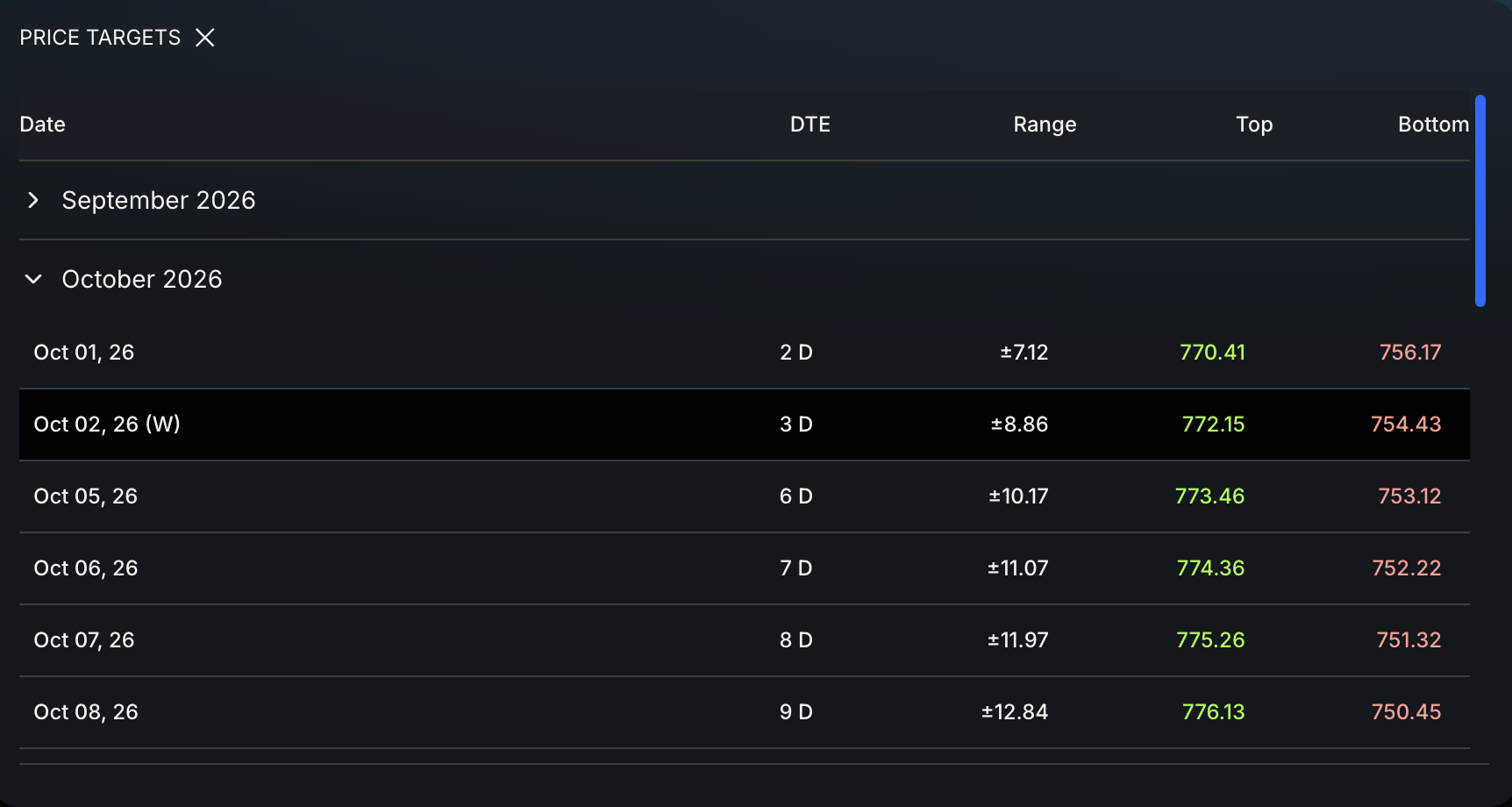
- Choose the destination. Open the Price Targets widget and select the monthly, quarterly, or yearly target that matches the expected holding period and the amount of attention you can give the trade.
The complete preparation checklist is:
- Quote widget: Confirm weekly or monthly bullish structure and momentum.
- Key Levels widget: Use P-Trans, N-Trans, and chart structure to define entry and invalidation.
- Price Targets widget: Choose a monthly, quarterly, or yearly destination.
- Charting platform: Copy the levels, add alerts, and define invalidation.
It is like packing lunch the night before. The work is easier when the important choices are already made.
What should happen during the workday?
Ideally, very little. A job-friendly plan should not require constant attention.
Use written rules such as:
- Focus on long setups that agree with the weekly or monthly uptrend.
- Enter only after a daily close or a planned alert.
- Hold no more positions than you can review.
- Avoid new trades before an earnings report unless the event is part of the strategy.
- Never place a hidden trade during work when distraction could create a mistake.
If a strategy needs minute-by-minute decisions, it does not fit the schedule.
The target horizon changes how often the trade may need attention:
- Weekly target: Requires the most attention because the move has less time.
- Monthly target: May still need frequent checks as price approaches the destination.
- Quarterly target: Gives the larger setup more time to develop.
- Yearly target: Usually requires less babysitting, but still needs event and structure reviews.
Longer targets do not remove risk. Earnings, news, gaps, and changes in market structure can still invalidate the trade.
How many swing trades can a part-time trader manage?
There is no correct number. The more of the entry, stop, and target process you can automate, the more positions you may be able to manage. Capital and attention still create limits.
Every open trade uses capital and creates another earnings date, alert, gap risk, and decision. Start with one or two positions. Add another only when each plan can be reviewed without rushing.
Frequently asked questions
Do I need to check the market all day?
No. Match the review schedule to the target. Weekly and monthly targets may require more attention. Quarterly and yearly targets usually require less day-to-day monitoring. Alerts and planned orders can reduce screen time, but they do not remove overnight or execution risk.
Can I swing trade only at night?
Research can happen at night, and orders can be prepared in advance. Shares may also be traded during supported premarket or after-hours sessions. For example, Webull currently accepts only limit orders during extended hours and warns that liquidity may be lower and spreads wider.
Most equity and ETF options trade during the regular options session, with limited exceptions. An options trader must be available during the supported session or use broker-supported orders prepared in advance.
Should I short stocks while working a full-time job?
No, not as the main wealth-building strategy in this full-time-job workflow. Downside moves can be sharp, quick, and highly volatile. Even during a larger decline, fast rallies can push a short position deeply against the trader. Short selling also adds borrowing, margin, and potentially unlimited-loss risk.
A short position may be used as a hedge to reduce risk in existing long positions. That is a separate job from using short trades as the main source of growth. A trader who cannot monitor the market during the day may be better served by waiting for long setups in a larger uptrend.
Should I tell my employer?
Follow your employer’s policies, especially if you work in finance or have access to material nonpublic information. Never use confidential workplace information to trade.
Sources
- Fidelity, What Is Trading?
- Charles Schwab, What Is Swing Trading and How Does It Work?
- TradingView, Order Brackets
- Webull, Supported Investments and Order Types
- Webull, Regular and Extended Hours Trading Sessions
Takeaway
Swing trading with a full-time job begins with a weekly or monthly bullish structure and improving momentum. Define the pullback entry, invalidation, position size, and target before work. Automate supported orders, match the target horizon to your available attention, and keep your career at the center of the workday.