To swing trade on Robinhood, build the plan first and use Robinhood only to place and manage the order. Choose a liquid stock or ETF, define the entry, invalidation, target, and position size, then select an order type that matches the plan.
Can you swing trade on Robinhood?
Yes. Robinhood lists the order types a swing plan needs: market, limit, stop, stop-limit, and trailing-stop orders, with good-for-day or good-til-canceled duration on supported orders. Because a swing trade is held overnight, it is not a same-day round trip, so it is planned and managed differently from a day trade. The account is still subject to Robinhood’s cash, margin, settlement, and risk rules, so check the current order screen and support pages before relying on any summary, including this one.
For a direct comparison of the two workloads and risk profiles, read swing trading vs day trading.
The workflow below is the same either way: build the plan first, then use Robinhood only to place and manage the order.
Robinhood is the broker in this workflow. Eden supplies options-derived market context. Your chart and written rules connect the two.
Step 1: Build a small watchlist
Build a small watchlist of liquid stocks or ETFs that meet these swing trading criteria:
- bullish market structure on the weekly or monthly time frame,
- bullish momentum that is beginning or getting stronger,
- enough trading activity to enter and exit without a large spread,
- and a clear reason the setup would become invalid.
Think of this as choosing a few healthy plants to care for instead of trying to water an entire forest. A short list makes it easier to notice when momentum begins and a valid entry appears.
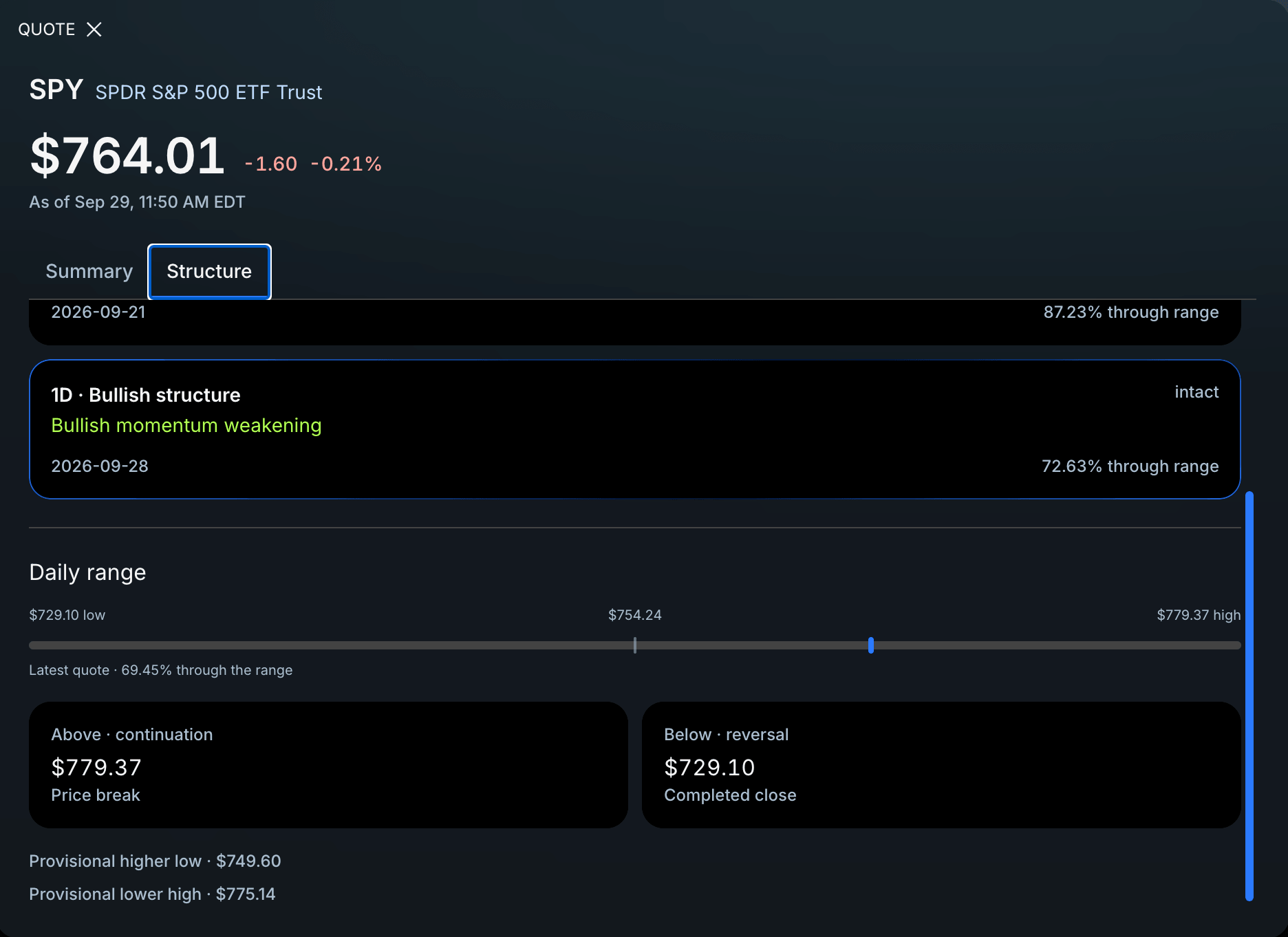
Eden’s Quote widget can summarize structure and momentum across the larger time frames. A trader can also identify structure by marking the major swing highs and swing lows on a chart.
Check for:
- earnings dates,
- major company events,
- market-moving economic releases,
- and whether you are willing to hold through them.
Step 2: Create the trade map
After a ticker passes the first step, create its roadmap before opening Robinhood. Open the ticker in Eden and mark:
- P-Trans and N-Trans,
- nearby areas of interest,
- the planned invalidation,
- and the weekly, monthly, quarterly, or yearly Price Target that matches the expected holding period.
P-Trans is Eden’s bullish trigger level. It can help identify where bullish momentum may begin. N-Trans is the bearish trigger level. Areas of interest are the unusually tall bars in the Key Levels histogram where price may react.
Copy those levels into the chart you use. Decide what price must do before you enter, such as hold or reclaim P-Trans. Then choose the next area of interest or major price target as the possible destination.
The roadmap should answer four questions before an order is placed:
- What must happen before I enter?
- What price behavior proves the idea wrong?
- Which major target am I aiming for?
- How much am I willing to lose if the idea fails?
Step 3: Define invalidation and size
Invalidation is the price behavior that proves the idea wrong. Position size should come from the distance between the planned entry and invalidation.
For example, if the plan can lose $50 and the entry-to-invalidation distance is $2 per share, the basic size would be 25 shares before accounting for gaps or other costs. This is an arithmetic example, not a recommended risk amount.
Step 4: Execute the order on Robinhood
Open the ticker in Robinhood, select Trade, and choose Buy or Sell. Enter the number of shares, then choose the order type that matches the roadmap. Robinhood currently lists these equity order types:
- market orders,
- limit orders,
- stop orders,
- stop-limit orders,
- and trailing-stop orders.
A market order seeks an immediate fill but does not guarantee the price. A limit order controls the worst acceptable price but may not fill. Stop and stop-limit orders have different behavior during fast moves and gaps.
Robinhood says equity market orders are good for the day, while other supported orders may be entered as good-for-day or good-til-canceled. Check the current order screen and support page because broker features can change.
Step 5: Review before submitting
Confirm:
- ticker,
- buy or sell,
- number of shares or contracts,
- order type,
- limit or stop price,
- duration,
- estimated cost,
- and buying power after the order.
Read the final confirmation screen. A typing error can ruin a good plan.
Step 6: Manage the swing trade
After entry, follow the original map. Review the position after the close and before the next session.
Do not turn a failed plan into a long-term investment because the trade is losing. Do not move the invalidation simply to avoid closing the position.
Important overnight risk
Stocks can gap after earnings, news, or economic events. A stop order becomes a market order after it triggers and may fill far from the stop price. A stop-limit order may avoid a worse price but may not execute.
Plan the position so one gap does not create an unacceptable loss.
What about swing trading options on Robinhood?
Options add expiration, time decay, volatility, assignment, and liquidity risks. Read What Is Swing Trading in Options? and the OCC disclosure document before trading them.
Frequently asked questions
Can you swing trade on Robinhood?
Yes. Robinhood supports limit, stop, stop-limit, and trailing-stop orders, which cover the execution needs of a typical swing plan. The trader still chooses the setup, the invalidation, and the size. Robinhood only executes the orders submitted.
Can I swing trade on Robinhood without a margin account?
Yes, swing trading is possible in a cash account, but cash-account rules depend on settled funds and the transactions you make. Check Robinhood’s current cash account and settlement guidance before placing repeated trades so an unsettled-funds restriction does not interrupt the plan.
Does Robinhood choose the swing trade for me?
No. The trader chooses the setup and risk. A broker executes orders based on the instructions submitted.
Can a stop guarantee my maximum loss?
No. A stop may fill at a worse price during a gap or fast market. A stop-limit order may not fill.
Official sources
- Robinhood, Order Types
- OCC, Characteristics and Risks of Standardized Options
Takeaway
Prepare the swing trade before opening Robinhood. Mark the setup, trigger, invalidation, target, and size. Then choose the order type carefully and review every field before submitting.